




 SportsChess Clock: Chess Game TimerThe perfect chess clock for casual games, tournaments, and competitive play.Explore app
Entertainment app by Fenuku Kekeli
Buzzer - Trivia Game Show
Bring game-show energy anywhere with Buzzerrrr a, fun buzzer for quizzes, trivia, parties, classrooms, family games, and friendly debates.


What it does
Run a trivia night with an iPhone buzzer
Bring game-show energy anywhere with Buzzerrrr a, fun buzzer for quizzes, trivia, parties, classrooms, family games, and friendly debates.
Need to decide who answered first? Want a dramatic reaction during game night? Just open Buzzerrrr and tap. The clear, responsive controls make it easy for everyone to join in.
WHY YOU’LL LOVE BUZZERRRR
buzzer action for decisions
Perfect for quizzes, trivia, contests, and team games
Add energy to parties, classrooms, and family nights
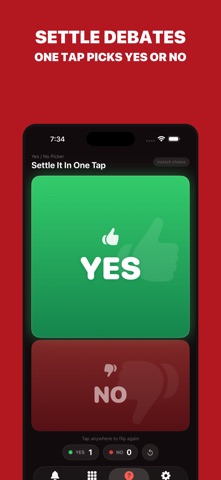
Settle friendly debates with a simple buzz-in
Fun reaction sounds that keep every round lively
From the App Store listing
A look inside
Official listing screenshots. Select an image to view it larger.
Use cases and capabilities
Tasks this app is listed for
These points come from the current App Store description.
- buzzer action for decisions
- Perfect for quizzes, trivia, contests, and team games
- Add energy to parties, classrooms, and family nights
- Settle friendly debates with a simple buzz-in
- Fun reaction sounds that keep every round lively
- Clean, easy interface anyone can use
Getting started
Check the listing, then try the app.
- Place the iPhone where players can see and reach the buzzer.
- Start a quiz, trivia round, contest, or friendly debate, then tap the app when it is time to buzz in.
- Use the reaction sound to move the game along; agree on how players take turns because the listing does not describe separate player accounts or automatic ranking.
These steps follow the features in the current App Store description. Exact controls can change between versions.
Need task-specific steps? A guide in the original archive covers this app.
Common questions
About Buzzer - Trivia Game Show
Can the buzzer tell which player tapped first?
The listing describes a simple on-screen buzzer and reaction sounds. It does not describe identifying players or keeping an automatic score.
Can I use it for a classroom quiz or party game?
The listing names quizzes, trivia, classrooms, parties, family games, and friendly debates as use cases.
More in Entertainment
Related apps
SportsChess Clock: Chess Game TimerThe perfect chess clock for casual games, tournaments, and competitive play.Explore app  Health & FitnessADHD Task: Schedule RemindersStruggle with forgetfulness or staying on track?Explore app
 LifestyleFishing Tracker: Fish LogFishing Tracker is a powerful tool designed for anglers who want to improve their fishing experience through smart tracking and detailed logs.Explore app
 SportsPickleball Padel ScoreboardScoreboard Pickleball & Padel helps players, coaches, and organizers keep every match clear from the first serve to match point.Explore app