


 EducationVoice to Text - Speech NotesTurn your voice into text with Voice to Text — the, simple, and powerful speech transcription app designed to help you capture ideas, notes, conversations, and important moments without typing.Explore app
Medical app by Fenuku Kekeli
Labor Contraction Tracker
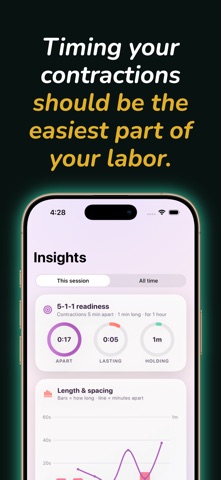
Timing your contractions should be the easiest part of your labor.


What it does
Time and record labor contractions on iPhone
Timing your contractions should be the easiest part of your labor. Designed with simplicity and clarity in mind, this minimalist contraction tracker helps you monitor your surges without any unnecessary distractions or confusing clutter.
Whether you are planning a home birth with a midwife or heading to the hospital, this app gives you the exact data you and your doula need. Simply tap a single button when a contraction starts, and tap it again when it ends. The app handles the rest, calculating both the duration and the frequency of your labor pains.
WHY EXPECTING PARENTS TRUST THIS TIMER:
One-Tap Tracking: Large, high-contrast start/stop button designed for easy tapping during intense moments.
Clear Labor Analysis: see your contraction frequency (measured from the start of one to the start of the next) and duration.
Medical Readout: A beautifully clean history log that you can easily show your doctor, midwife, or labor nurse.
Progression Alerts: Subtle, smart indicators that visualize if your labor is intensifying or settling into a consistent pattern.
Minimalist Design: No overwhelming ads, bright flashing lights, or complex menus—just the vital tracking tools you need right now.
From the App Store listing
A look inside
Official listing screenshots. Select an image to view it larger.
Use cases and capabilities
Tasks this app is listed for
These points come from the current App Store description.
- One-Tap Tracking: Large, high-contrast start/stop button designed for easy tapping during intense moments.
- Clear Labor Analysis: see your contraction frequency (measured from the start of one to the start of the next) and duration.
- Medical Readout: A beautifully clean history log that you can easily show your doctor, midwife, or labor nurse.
- Progression Alerts: Subtle, smart indicators that visualize if your labor is intensifying or settling into a consistent pattern.
- Minimalist Design: No overwhelming ads, bright flashing lights, or complex menus—just the vital tracking tools you need right now.
Getting started
Check the listing, then try the app.
- Tap the start control when a contraction begins, then tap it again when that contraction ends.
- Check the recorded duration and the interval from the start of one contraction to the start of the next.
- Use the history as a log to describe what you recorded to your doctor, midwife, or labor nurse; follow your own care team’s instructions.
These steps follow the features in the current App Store description. Exact controls can change between versions.
Common questions
About Labor Contraction Tracker
What does the contraction tracker calculate?
The listing says it records start and end taps, then calculates contraction duration and frequency, measured from the start of one contraction to the start of the next.
Can this app tell me when to go to the hospital?
No. A timer records and organizes entries; it cannot confirm labor or assess you or your baby. Follow your birth plan and contact your doctor, midwife, or labor unit for guidance.
More in Medical
Related apps
EducationVoice to Text - Speech NotesTurn your voice into text with Voice to Text — the, simple, and powerful speech transcription app designed to help you capture ideas, notes, conversations, and important moments without typing.Explore app  UtilitiesRing Size Measure - Ring SizerFind your exact ring size using a simple, and mobile-friendly ring sizing tool.Explore app
 Photo & VideoPhoto Blur: Hide Face & TextTap to Blur is a simple photo editing tool designed to help you protect privacy in your images.Explore app
 UtilitiesSpeech to Text | Voice TypingStop typing the slow way.Explore app