


 EducationVoice to Text - Speech NotesTurn your voice into text with Voice to Text — the, simple, and powerful speech transcription app designed to help you capture ideas, notes, conversations, and important moments without typing.Explore app
Travel app by Fenuku Kekeli
Packing List & Checklist
Never forget an essential item again.


What it does
Build a travel packing checklist on iPhone
Never forget an essential item again. Packing List & Checklist helps you organize, track, and complete everything you need for your trip — stress-free.
Whether you’re traveling for vacation, business, school, or daily activities, our smart packing system keeps you prepared every time.
Create custom packing lists
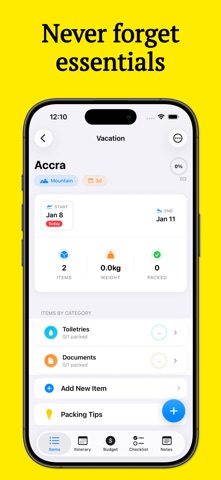
Organize items by category
Track packing progress visually
Set item quantity and priority
Smart checklists for easy packing
Works offline — anytime, anywhere
From the App Store listing
A look inside
Official listing screenshots. Select an image to view it larger.
Use cases and capabilities
Tasks this app is listed for
These points come from the current App Store description.
- Create custom packing lists
- Organize items by category
- Track packing progress visually
- Set item quantity and priority
- Smart checklists for easy packing
- Works offline — anytime, anywhere
Getting started
Check the listing, then try the app.
- Create a list for the trip or activity you are preparing for.
- Add items, organize them by category, and set quantities or priorities where useful.
- Check items off as you pack and review the progress indicator before leaving; the listing says lists work offline.
These steps follow the features in the current App Store description. Exact controls can change between versions.
Need task-specific steps? A guide in the original archive covers this app.
How to Build a Travel Packing List on iPhone and Track What’s Packed ↗
Common questions
About Packing List & Checklist
Can I organize packing items by category?
Yes. The listing describes categories, item quantities and priorities, and a visual packing-progress checklist.
Can I use the packing list without internet?
The listing says the app works offline. If you need to sync a list between devices, check the current app because sync is not described.
More in Travel
Related apps
EducationVoice to Text - Speech NotesTurn your voice into text with Voice to Text — the, simple, and powerful speech transcription app designed to help you capture ideas, notes, conversations, and important moments without typing.Explore app  ShoppingWishlist - Gift & ShoppingOrganize your wishes, gifts, and shopping ideas in one simple app.Explore app
 UtilitiesSpeech to Text | Voice TypingStop typing the slow way.Explore app
 Health & FitnessADHD Task: Schedule RemindersStruggle with forgetfulness or staying on track?Explore app