


 UtilitiesContacts To Excel Sheet, CSVNever lose your important contacts again!Explore app
Utilities app by Fenuku Kekeli
Contacts To XLSX, CSV, Outlook
Backup and export your contacts in multiple formats with just one tap!


What it does
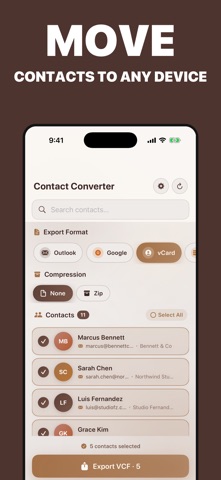
Export iPhone contacts to Excel, CSV or Outlook-compatible format
Backup and export your contacts in multiple formats with just one tap! Convert your phonebook into vCard (.vcf), Excel (.xlsx), or JSON (.json) files and easily share or import them into iCloud, Outlook, Google Contacts, and more.
Perfect for users who want secure backups, device switching, or contact migration.
From the App Store listing
A look inside
Official listing screenshots. Select an image to view it larger.
Use cases and capabilities
Tasks this app is listed for
These points come from the current App Store description.
- Perfect for users who want secure backups, device switching, or contact migration.
Getting started
Check the listing, then try the app.
- Open the exporter and choose the phonebook contacts you want to back up or transfer.
- Select vCard (.vcf), Excel (.xlsx), or JSON (.json) as the output format.
- Save or share the exported file, then check that it opens correctly before using it to restore or move contacts.
These steps follow the features in the current App Store description. Exact controls can change between versions.
Common questions
About Contacts To XLSX, CSV, Outlook
Which formats can I export?
The listing names vCard (.vcf), Excel (.xlsx), and JSON (.json). It also says files can be shared or imported into iCloud, Outlook, and Google Contacts.
Does this app import contacts too?
The listing emphasizes backup and export, then sharing or importing the resulting file in another contacts service. It does not describe importing a file back into the iPhone through this app.
More in Utilities
Related apps
UtilitiesContacts To Excel Sheet, CSVNever lose your important contacts again!Explore app  UtilitiesContacts Export & ImportEasily import contacts from CSV, Excel, or vCard files and save them directly to your iPhone.Explore app
 UtilitiesCSV to Excel ConverterCSV to Excel Converter is a simple tool that allows you to convert CSV files into Excel (XLSX) spreadsheets.Explore app
 UtilitiesExcel to PDF Converter | XLSXExcel to PDF Converter is a tool designed to convert spreadsheet files into high-quality PDF documents.Explore app