


 Health & FitnessADHD Task: Schedule RemindersStruggle with forgetfulness or staying on track?Explore app
Music app by Fenuku Kekeli
Metronome Tuner
Stay in rhythm with our easy-to-use metronome, designed for musicians of all levels.


What it does
Metronome and instrument tuner for iPhone music practice
Stay in rhythm with our easy-to-use metronome, designed for musicians of all levels. Whether you’re practicing at home, performing live, or composing music, this app ensures perfect timing every time.
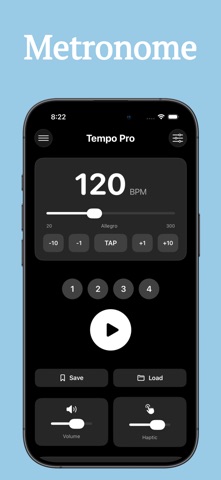
Adjustable tempo from 20 to 300 BPM
Multiple time signatures (2/4, 3/4, 4/4, 6/8, and more)
Visual and audible beat indicators
Subdivision options: quarter, eighth, triplet, sixteenth notes
Tap tempo to match your pace
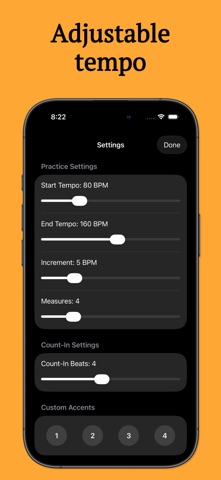
Customizable sounds and accents for each beat
Sleek, minimal interface for distraction-free practice
From the App Store listing
A look inside
Official listing screenshots. Select an image to view it larger.
Use cases and capabilities
Tasks this app is listed for
These points come from the current App Store description.
- Adjustable tempo from 20 to 300 BPM
- Multiple time signatures (2/4, 3/4, 4/4, 6/8, and more)
- Visual and audible beat indicators
- Subdivision options: quarter, eighth, triplet, sixteenth notes
- Tap tempo to match your pace
Getting started
Check the listing, then try the app.
- Set the tempo between 20 and 300 BPM, or tap along to use tap tempo.
- Choose a time signature and beat subdivision, then set the sound and accents for each beat.
- Start the metronome and keep practicing while it plays in the background if needed.
These steps follow the features in the current App Store description. Exact controls can change between versions.
Common questions
About Metronome Tuner
Can I set an unusual meter or subdivision?
The listing names several time signatures, including 2/4, 3/4, 4/4, and 6/8, plus quarter, eighth, triplet, and sixteenth-note subdivisions.
Can I keep the metronome running while using another app?
The listing says background playback is supported.
More in Music
Related apps
Health & FitnessADHD Task: Schedule RemindersStruggle with forgetfulness or staying on track?Explore app  LifestyleFishing Tracker: Fish LogFishing Tracker is a powerful tool designed for anglers who want to improve their fishing experience through smart tracking and detailed logs.Explore app
 Health & FitnessPush Up Rep CounterStop counting reps in your head.Explore app
 Health & FitnessA1C Tracker & Blood Sugar LogManage your health with ease!Explore app