



 Health & FitnessSquats Counter & Leg WorkoutTake your leg workouts to the next level!Explore app
Health & Fitness app by Fenuku Kekeli
Push Up Rep Counter
Stop counting reps in your head.


What it does
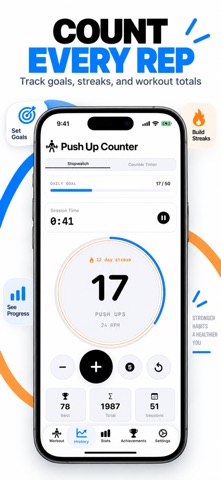
Automatically count push-ups on iPhone
Stop counting reps in your head. Whether you are a beginner or a calisthenics pro, Push Up Counter uses your phone’s proximity sensor to count every single push up automatically.
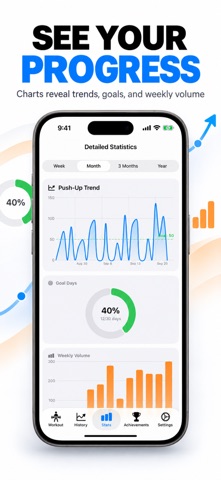
Perfect for home workouts, this app acts as your personal fitness coach, tracking your sets, reps, and calories burned in real-time.
Hands-Free Counting: Just place your phone on the floor under your chest.
Custom Training Plans: Programs designed to get you from 0 to 100 push-ups.
Rest Timer: Built-in auto-timer between sets to optimize muscle recovery.
Daily Reminders: Never miss a chest workout with smart notifications.
Privacy First: No registration required. All your fitness data stays on your device.
From the App Store listing
A look inside
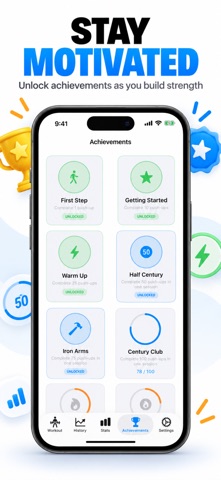
Official listing screenshots. Select an image to view it larger.
Use cases and capabilities
Tasks this app is listed for
These points come from the current App Store description.
- Perfect for home workouts, this app acts as your personal fitness coach, tracking your sets, reps, and calories burned in real-time.
- Hands-Free Counting: Just place your phone on the floor under your chest.
- Custom Training Plans: Programs designed to get you from 0 to 100 push-ups.
- Rest Timer: Built-in auto-timer between sets to optimize muscle recovery.
- Daily Reminders: Never miss a chest workout with smart notifications.
Getting started
Check the listing, then try the app.
- Place the iPhone flat on the floor below your chest as the listing instructs, and make sure the sensor area is not covered.
- Do a short test set and check that the counter responds to your movement before starting a longer workout.
- Use the app’s training plan or set tracking, then follow its rest timer between sets and review the recorded workout.
These steps follow the features in the current App Store description. Exact controls can change between versions.
Common questions
About Push Up Rep Counter
How does the app count push-ups?
The App Store description says it uses the iPhone proximity sensor. Phone placement and the sensor area matter, so test the setup before relying on a full workout count.
Does it include a workout plan?
Yes. The listing describes training plans, set and rep tracking, a rest timer, and daily reminders. Check the current plan and adjust your workout to your own ability.
More in Health & Fitness
Related apps
Health & FitnessSquats Counter & Leg WorkoutTake your leg workouts to the next level!Explore app  GamesScore Point Counter For SkyjoSkyjo Scorekeeper - Your Ultimate Game CompanionExplore app
 UtilitiesLap Counter - Run, Swim, CycleLap Counter – Simple & Lap TrackingExplore app
 UtilitiesTally Counter · Click & TrackThe ultimate tally counter app for, counting.Explore app