



 Health & FitnessPush Up Rep CounterStop counting reps in your head.Explore app
Health & Fitness app by Fenuku Kekeli
Squats Counter & Leg Workout
Take your leg workouts to the next level!


What it does
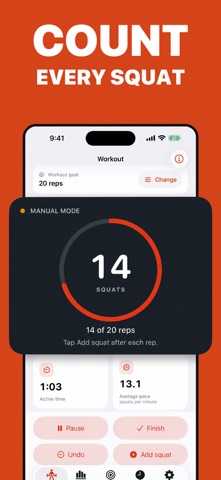
Automatic squat rep counter with goals, reminders, and workout history
Take your leg workouts to the next level! Squat Tracker helps you count, log, and track your daily squats with ease. Perfect for home or gym workouts, it keeps you motivated and improves your glutes, quads, and core strength.
Automatic squat counting with simple interface
Custom daily goals & reminders
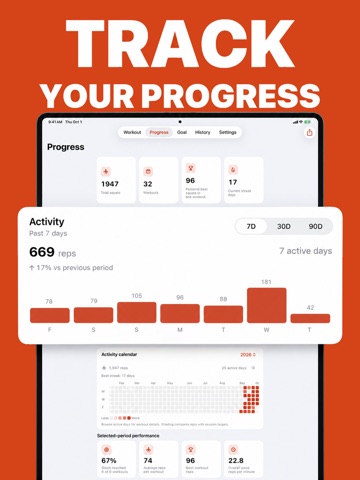
Track your progress over time with graphs
Works offline, no equipment needed
Syncs with Health app (optional)
End with call-to-action: “Download now and start your leg transformation today!”
From the App Store listing
A look inside
Official listing screenshots. Select an image to view it larger.
Use cases and capabilities
Tasks this app is listed for
These points come from the current App Store description.
- Automatic squat counting with simple interface
- Custom daily goals & reminders
- Track your progress over time with graphs
- Works offline, no equipment needed
- Syncs with Health app (optional)
Getting started
Check the listing, then try the app.
- Set a daily squat goal and choose whether you want a reminder before starting a session.
- Start the counter and follow the in-app prompts while completing your workout.
- Check the recorded total and graph afterward; enable Health syncing only if you want to connect the app with Apple Health.
These steps follow the features in the current App Store description. Exact controls can change between versions.
Common questions
About Squats Counter & Leg Workout
Does the app count squats automatically?
The listing describes automatic squat counting. Review the session total in the app after exercising.
Can I sync squat activity with Apple Health?
The listing describes Health syncing as optional. You can leave it off if you do not want to connect the app.
More in Health & Fitness
Related apps
Health & FitnessPush Up Rep CounterStop counting reps in your head.Explore app  GamesScore Point Counter For SkyjoSkyjo Scorekeeper - Your Ultimate Game CompanionExplore app
 UtilitiesLap Counter - Run, Swim, CycleLap Counter – Simple & Lap TrackingExplore app
 UtilitiesTally Counter · Click & TrackThe ultimate tally counter app for, counting.Explore app