

 GamesScore Point Counter For SkyjoSkyjo Scorekeeper - Your Ultimate Game CompanionExplore app
Utilities app by Fenuku Kekeli
Tally Counter · Click & Track
The ultimate tally counter app for, counting.


What it does
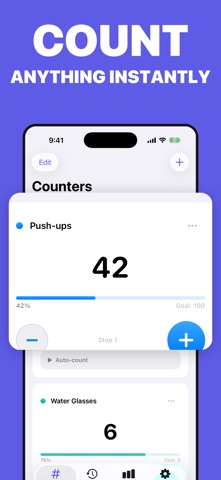
Multi-counter tally app with history, custom steps, and CSV or PDF export
The ultimate tally counter app for, counting. Whether you're tracking inventory, keeping score in sports, counting people, or managing events, this app makes it. Simple, and — everything you need in a counter, right in your pocket!
Unlimited Counters & History: Keep track of everything without limits. Create as many counters as you need and access your full count history anytime.
Export CSV & PDF Reports: Share your counts. Generate professional reports with a single tap.
Home Screen Widget: Count without even opening the app. Your most-used counters always within reach.
Advanced Analytics: See trends and insights at a glance. Understand your counting patterns over time.
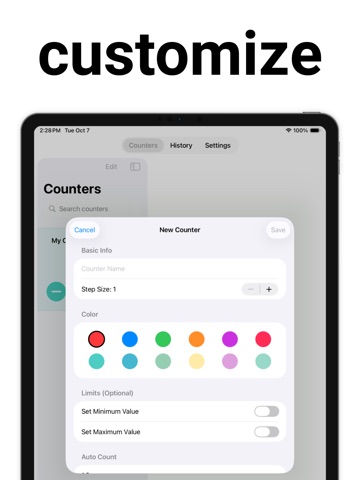
Customizable Step Values: Count by 1, 2, 5, 10 — or any custom increment. Perfect for inventory and scoring.
Ad-Free Experience: Focus on counting, distraction-free. No interruptions, ever.
Sports scoring & lap counting
From the App Store listing
A look inside
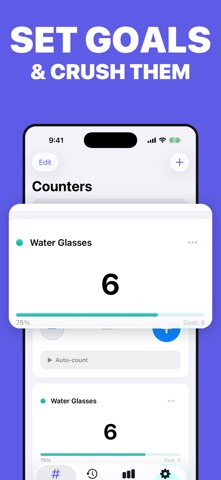
Official listing screenshots. Select an image to view it larger.
Use cases and capabilities
Tasks this app is listed for
These points come from the current App Store description.
- Inventory management
- Sports scoring & lap counting
- Attendance & people counting
- Event management
- Manufacturing & quality control
- Personal habit tracking
Getting started
Check the listing, then try the app.
- Create a named counter for each activity or item you want to track and choose the step value that matches how you plan to count.
- Tap the matching counter as events occur, then review its count history or statistics when you need a recap.
- Export a CSV or PDF report for the counter you want to share or archive.
These steps follow the features in the current App Store description. Exact controls can change between versions.
Common questions
About Tally Counter · Click & Track
Can I keep several counts separate?
Yes. The listing describes creating multiple counters and viewing their individual histories.
Can I export counts?
Yes. The listing describes exporting count reports as CSV or PDF.
More in Utilities
Related apps
GamesScore Point Counter For SkyjoSkyjo Scorekeeper - Your Ultimate Game CompanionExplore app  UtilitiesLap Counter - Run, Swim, CycleLap Counter – Simple & Lap TrackingExplore app
 Health & FitnessPush Up Rep CounterStop counting reps in your head.Explore app
 Health & FitnessSquats Counter & Leg WorkoutTake your leg workouts to the next level!Explore app