




 Photo & VideoPhoto to Video Montage MakerTurn your photos and clips into beautiful slideshow videos in minutes.Explore app
Photo & Video app by Fenuku Kekeli
Photo Collage Maker – Picframe
Turn your favorite photos into beautiful collages with Photo Collage Maker.


What it does
Put photos side by side in a bordered collage on iPhone
Turn your favorite photos into beautiful collages with Photo Collage Maker. Choose from stylish layouts, customize your images, and create eye-catching photo grids for social media.
Perfect for Instagram posts, stories, memories, and creative photo layouts.
Beautiful photo collage layouts
Square, vertical, and story formats
Adjust spacing and borders
Simple drag and drop photo editing
Perfect for Instagram and social media
Select your photos, pick a layout, and create a stunning collage.
From the App Store listing
A look inside
Official listing screenshots. Select an image to view it larger.
Use cases and capabilities
Tasks this app is listed for
These points come from the current App Store description.
- Beautiful photo collage layouts
- Create photo grids
- Square, vertical, and story formats
- Adjust spacing and borders
- Simple drag and drop photo editing
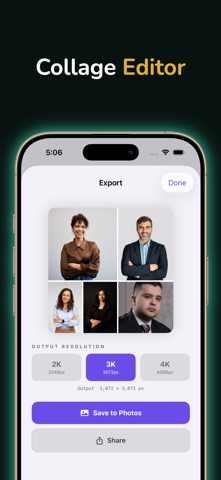
- High-resolution export
Getting started
Check the listing, then try the app.
- Choose the photos you want to include and select a collage layout or grid.
- Drag photos into position, then adjust the spacing and border to separate the images.
- Choose a square, vertical, or story format, export the collage, and check the crop before posting.
These steps follow the features in the current App Store description. Exact controls can change between versions.
Need task-specific steps? A guide in the original archive covers this app.
How to Put Two Photos Side by Side on iPhone With a Border ↗
How to Make a Vertical Photo Collage for Instagram Stories ↗
Common questions
About Photo Collage Maker – Picframe
Can I place two photos side by side?
The listing describes collage layouts and photo grids; choose a layout that places the selected images next to each other.
Can I add a border between images?
Yes. The listing says spacing and borders can be adjusted, and it supports square, vertical, and story formats.
More in Photo & Video
Related apps
Photo & VideoPhoto to Video Montage MakerTurn your photos and clips into beautiful slideshow videos in minutes.Explore app  Photo & VideoPhoto & Video MergerPhotos & Videos Merger – Create Stunning Videos from Your Favorite MemoriesExplore app
 UtilitiesMarquee LED Sign MakerTransform Your Phone into a LED Banner Display!Explore app
 UtilitiesWatermark on Photos: StampPhotographers sending proofs to clients Realtors branding listing photos Designers and illustrators posting portfolio work Small businesses stamping product and catalog shots Creators protecting images before they…Explore app