




 UtilitiesPDF Maker - Editor & ConverterPDF Maker turns your iPhone into a full document workflow — scan, edit, convert, and share professional PDFs.Explore app
Utilities app by Fenuku Kekeli
Marquee LED Sign Maker
Transform Your Phone into a LED Banner Display!


What it does
Create an LED scrolling text sign on iPhone
Transform Your Phone into a LED Banner Display!
LED Banner Pro turns your device into a powerful scrolling message board with stunning visual effects. Perfect for events, sports games, protests, celebrations, or getting attention!
MULTIPLE DISPLAY EFFECTS
Smooth Scroll - Classic LED sign experience
Blink & Flash - Get maximum attention
Fade & Pulse - Elegant transitions
Bounce & Wave - Fun animated effects
Typewriter - Retro character-by-character
From the App Store listing
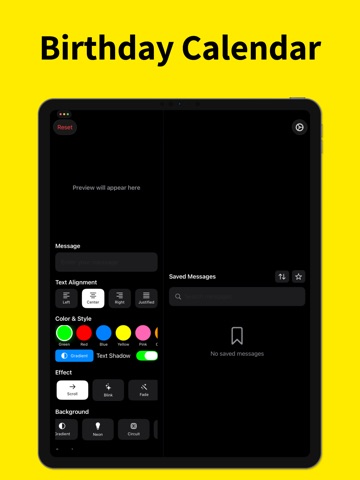
A look inside
Official listing screenshots. Select an image to view it larger.
Use cases and capabilities
Tasks this app is listed for
These points come from the current App Store description.
- Smooth Scroll - Classic LED sign experience
- Blink & Flash - Get maximum attention
- Fade & Pulse - Elegant transitions
- Bounce & Wave - Fun animated effects
- Typewriter - Retro character-by-character
- Rainbow & Spiral - Eye-catching animations
Getting started
Check the listing, then try the app.
- Enter and save the message you want to display.
- Choose a scroll, fade, or other display effect, then set the color, font, size, alignment, and speed.
- Adjust brightness for the setting and turn on mirror mode if the phone will face through a window; preview the sign before displaying it.
These steps follow the features in the current App Store description. Exact controls can change between versions.
Common questions
About Marquee LED Sign Maker
Can I use a mirror image for a window display?
The listing includes a Mirror Mode feature and specifically recommends it for window displays.
Can I change the text style and scrolling speed?
The listing describes multiple colors and fonts, several text sizes and alignments, and adjustable display speed.
More in Utilities
Related apps
UtilitiesPDF Maker - Editor & ConverterPDF Maker turns your iPhone into a full document workflow — scan, edit, convert, and share professional PDFs.Explore app  UtilitiesSpreadsheet maker: view & editCreate powerful spreadsheets with a easy-to-use XLSX creator.Explore app
 Photo & VideoPhoto to Video Montage MakerTurn your photos and clips into beautiful slideshow videos in minutes.Explore app
 UtilitiesPresentation Maker - SlideDeckSlideDesk helps you create stunning presentations.Explore app