




 UtilitiesPDF Page Remover: Edit PagesClean up any PDF.Explore app
Utilities app by Fenuku Kekeli
Spreadsheet maker: view & edit
Create powerful spreadsheets with a easy-to-use XLSX creator.


What it does
Create and edit Excel-compatible XLSX spreadsheets on iPhone
Create powerful spreadsheets with a easy-to-use XLSX creator. Whether you are building data tables, organizing information, or preparing reports, this app gives you a simple and efficient way to create Excel-compatible files anytime.
Designed for speed and simplicity, you can create, edit, and export spreadsheets without any complicated steps. Everything works smoothly, even offline, so your files remain private and accessible wherever you are.
This app is perfect for students, professionals, and anyone who needs a spreadsheet tool on the go.
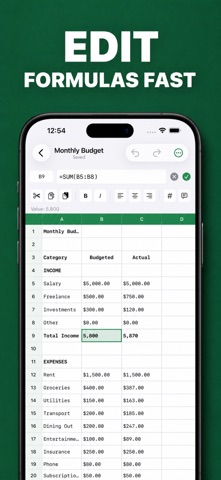
Create XLSX Files Build spreadsheets with a clean and intuitive interface. Add rows and columns and structure your data exactly the way you want.
Edit and Update Data Modify cells, update values, and organize your content بسهولة. Keep your spreadsheets and up to date at all times.
Table Builder Create structured tables for lists, reports, budgets, and more. Easily manage rows and columns for better organization.
Export to XLSX Generate fully compatible Excel files that are ready to open in spreadsheet applications.
Performance Enjoy smooth and responsive performance, even with larger data sets. Create and export files.
From the App Store listing
A look inside
Official listing screenshots. Select an image to view it larger.
Use cases and capabilities
Tasks this app is listed for
These points come from the current App Store description.
- Designed for speed and simplicity, you can create, edit, and export spreadsheets without any complicated steps. Everything works smoothly, even offline, so your files remain private and accessible wherever you are.
- This app is perfect for students, professionals, and anyone who needs a spreadsheet tool on the go.
- Create XLSX Files Build spreadsheets with a clean and intuitive interface. Add rows and columns and structure your data exactly the way you want.
- Edit and Update Data Modify cells, update values, and organize your content بسهولة. Keep your spreadsheets and up to date at all times.
- Table Builder Create structured tables for lists, reports, budgets, and more. Easily manage rows and columns for better organization.
Getting started
Check the listing, then try the app.
- Create a workbook and add the rows and columns needed for the list, report, or small data table.
- Enter or update cell values, and review the table structure before exporting.
- Export the workbook as XLSX, then open the saved file in the app you plan to use and check that the data and layout carried over.
These steps follow the features in the current App Store description. Exact controls can change between versions.
Need task-specific steps? A guide in the original archive covers this app.
How to Make a Spreadsheet on iPhone and Export an XLSX File ↗
Common questions
About Spreadsheet maker: view & edit
Can I save an Excel-compatible file?
Yes. The listing describes exporting spreadsheets as XLSX files for use in spreadsheet applications.
Can I work without internet?
The listing says the app works offline. Confirm that any device-specific or file-sharing step you need is available in the current version.
More in Utilities
Related apps
UtilitiesPDF Page Remover: Edit PagesClean up any PDF.Explore app  UtilitiesMarquee LED Sign MakerTransform Your Phone into a LED Banner Display!Explore app
 UtilitiesPresentation Maker - SlideDeckSlideDesk helps you create stunning presentations.Explore app
 UtilitiesWrite on PDF: Edit & AnnotateWrite, type, draw, highlight, sign, and add notes directly to your PDF documents.Explore app