




 LifestylePray Unlock: Salah Screen TimePrayer lock is a Muslim-focused Screen Time app designed to help you stay consistent with your daily prayers by reducing phone distractions during Salah.Explore app
Productivity app by Fenuku Kekeli
Prayer lock - Pray Screen Time
Pray First.


What it does
Block selected iPhone apps during prayer and devotion time
Pray First. Lock Distractions. Stay Focused.
Pray Screen Time – Prayer Lock helps you put faith before distraction by temporarily blocking distracting apps during prayer and devotional time.
In a world full of notifications, this app gives you space to pause, pray, and reconnect with God.
Select apps that distract you Choose prayer or devotion times Apps are temporarily locked Focus fully on prayer — no interruptions
All blocking is user-controlled and temporary, using Apple’s official Screen Time system.
Whether it’s morning prayer, daily devotion, or quiet time with God, Prayer Lock helps you stay disciplined and intentional.
No tracking. No monitoring. No ads.
App blocking during prayer time Daily prayer & devotion reminders Simple, clean Christian design Uses Apple Screen Time (safe & private) No account required Works completely on-device
From the App Store listing
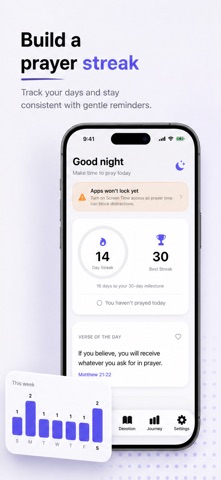
A look inside
Official listing screenshots. Select an image to view it larger.
Use cases and capabilities
Tasks this app is listed for
These points come from the current App Store description.
- Pray Screen Time – Prayer Lock helps you put faith before distraction by temporarily blocking distracting apps during prayer and devotional time.
- In a world full of notifications, this app gives you space to pause, pray, and reconnect with God.
- Select apps that distract you Choose prayer or devotion times Apps are temporarily locked Focus fully on prayer — no interruptions
- All blocking is user-controlled and temporary, using Apple’s official Screen Time system.
- Whether it’s morning prayer, daily devotion, or quiet time with God, Prayer Lock helps you stay disciplined and intentional.
Getting started
Check the listing, then try the app.
- Select the apps you want to keep out of reach during prayer or devotion.
- Choose the times for the restriction to apply.
- Review Screen Time access and confirm the selected apps and schedule, then adjust them when your routine changes.
These steps follow the features in the current App Store description. Exact controls can change between versions.
Common questions
About Prayer lock - Pray Screen Time
Does Prayer Lock block every app on the iPhone?
No. The listing describes temporarily blocking the apps you select; other apps remain available.
Can I use Apple’s built-in Screen Time instead?
Yes. iPhone Screen Time has scheduled Downtime and app limits. This app’s listing provides a prayer/devotion-oriented setup; check which approach fits your schedule.
More in Productivity
Related apps
LifestylePray Unlock: Salah Screen TimePrayer lock is a Muslim-focused Screen Time app designed to help you stay consistent with your daily prayers by reducing phone distractions during Salah.Explore app  ReferenceBible Widget: Verses & PrayersBring God’s Word to your home screen with beautiful Bible widgets, daily verses, prayers, and devotionals designed to strengthen your faith every day.Explore app
 ProductivityScreen Time Control : DoUnlockMake distracting apps wait until your priorities are done.Explore app
 UtilitiesScreen Time - Steps Unlock AppTake control of your screen time by earning access with movement.Explore app