



 ProductivityStudy Organizer For StudentsMain Features (use bullet style):Explore app
Education app by Fenuku Kekeli
Study Timer For Student
“Struggling to stay focused?


What it does
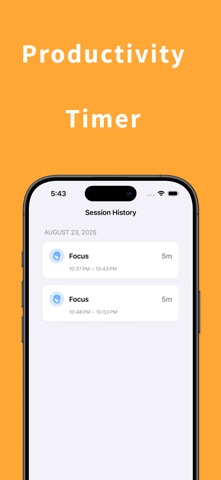
Student Pomodoro timer with custom session lengths and progress tracking
“Struggling to stay focused? Focus Timer helps you beat distractions with science-backed Pomodoro sessions.”
Key Features (bullet points)
Study & work focus sessions
Streak tracking for motivation
Progress stats & analytics
Minimalist, distraction-free design
“Stay consistent. Stay focused. Download Focus Timer today and unlock your productivity.”
From the App Store listing
A look inside
Official listing screenshots. Select an image to view it larger.
Use cases and capabilities
Tasks this app is listed for
These points come from the current App Store description.
- Key Features (bullet points)
- Study & work focus sessions
- Streak tracking for motivation
- Progress stats & analytics
- Minimalist, distraction-free design
Getting started
Check the listing, then try the app.
- Choose a custom focus-session length that fits the study or work block you want to time.
- Start the session and follow the timer until it ends; begin a new session when you are ready to continue.
- Review the saved streak and progress statistics after a session to see what the app recorded.
These steps follow the features in the current App Store description. Exact controls can change between versions.
Common questions
About Study Timer For Student
Can I set my own focus length?
Yes. The listing describes custom session lengths for study and work.
Does this timer block distracting apps?
The listing describes focus sessions, streaks, and statistics, but does not mention app blocking. Check the current feature list if blocking is important to you.
More in Education
Related apps
ProductivityStudy Organizer For StudentsMain Features (use bullet style):Explore app  UtilitiesFocus Timer For Productivity ®“Struggle to stay focused?Explore app
 UtilitiesPomodoro Focus Timer -StudieAchieve peak focus with Studie – Pomodoro Focus Timer.Explore app
 GamesScore Point Counter For SkyjoSkyjo Scorekeeper - Your Ultimate Game CompanionExplore app