




 UtilitiesAudio File To Text TranscribeStop typing and start recording.Explore app
Utilities app by Fenuku Kekeli
Video To Text - Transcribe MP4
Turn videos into readable text.


What it does
Video transcription app for timestamped editable text on iPhone
Turn videos into readable text.
Video To Text - Transcribe MP4 helps you convert spoken content in your videos into clean, searchable transcripts. Import a video, transcribe the speech, edit the result, and export the text in the format you need.
- Transcribe videos into readable text - Use on-device speech recognition after the model is downloaded - Choose the spoken language or let the app detect it - Review timestamped transcript lines and jump back to the matching moment in the video - Edit transcripts directly in the app - Save transcripts in your library - Search saved transcripts - Export as plain text, PDF, DOCX, Markdown, CSV, SRT, or VTT - Copy, save, or share your transcript - Translate transcript text with Google Translate
1. Import a video from your library or files. 2. Tap Transcribe and let the app convert speech into text. 3. Edit, search, export, copy, or share the transcript.
Video To Text is useful for lectures, meetings, interviews, voice notes, tutorials, clips, and any video where the spoken words matter.
Transcription runs on your device after the speech model is downloaded. Translation uses Google Translate and sends transcript text to Google's translation service.
From the App Store listing
A look inside
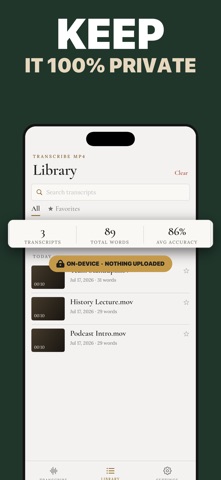
Official listing screenshots. Select an image to view it larger.
Use cases and capabilities
Tasks this app is listed for
These points come from the current App Store description.
- Transcribe videos into readable text
- Use on-device speech recognition after the model is downloaded
- Choose the spoken language or let the app detect it
- Review timestamped transcript lines and jump back to the matching moment in the video
- Edit transcripts directly in the app
- Save transcripts in your library
Getting started
Check the listing, then try the app.
- Import a video file and choose its spoken language, or use language detection if appropriate.
- Run transcription, then check timestamped lines against the video and correct mistakes.
- Save the transcript and export it in a listed format such as TXT, PDF, DOCX, SRT, or VTT.
These steps follow the features in the current App Store description. Exact controls can change between versions.
Need task-specific steps? A guide in the original archive covers this app.
Common questions
About Video To Text - Transcribe MP4
Can I edit a transcript after transcription?
The listing describes editing transcript lines directly in the app. Review names, numbers, and technical terms before sharing.
Does transcription work offline?
The listing says recognition runs on device after its model is downloaded. Confirm the model and language are ready before working offline.
More in Utilities
Related apps
UtilitiesAudio File To Text TranscribeStop typing and start recording.Explore app  UtilitiesSpeech to Text | Voice TypingStop typing the slow way.Explore app
 EducationVoice to Text - Speech NotesTurn your voice into text with Voice to Text — the, simple, and powerful speech transcription app designed to help you capture ideas, notes, conversations, and important moments without typing.Explore app
 UtilitiesVideo file Size CompressorVideo Compressor Pro - Shrink Videos, Save Space!Explore app