


 UtilitiesVideo To Text - Transcribe MP4Turn videos into readable text.Explore app
Utilities app by Fenuku Kekeli
Audio File To Text Transcribe
Stop typing and start recording.


What it does
Transcribe audio files to text on iPhone
Stop typing and start recording. Uses state-of-the-art AI to turn your voice, interviews, meetings, and videos into text.
Whether you are a student recording lectures, a journalist interviewing sources, or a business professional capturing meeting minutes, our AI Transcriber saves you hours of manual work.
High Accuracy: Powered by advanced speech recognition engines.
AI Summaries: Don't just transcribe—summarize. Get the key takeaways.
Export Anywhere: Save your transcripts as PDF, TXT, or DOCX.
Live Transcription: Watch the text appear in real-time as you speak.
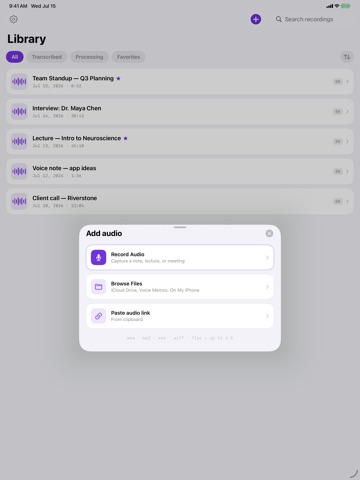
Supports All Major Formats: Convert MP3, M4A, WAV, and even Video files into text with a single tap.
From the App Store listing
A look inside
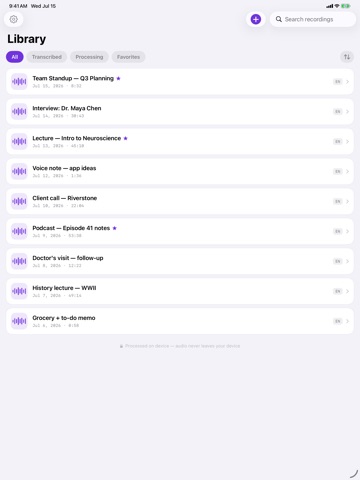
Official listing screenshots. Select an image to view it larger.
Use cases and capabilities
Tasks this app is listed for
These points come from the current App Store description.
- Whether you are a student recording lectures, a journalist interviewing sources, or a business professional capturing meeting minutes, our AI Transcriber saves you hours of manual work.
- High Accuracy: Powered by advanced speech recognition engines.
- AI Summaries: Don't just transcribe—summarize. Get the key takeaways.
- Export Anywhere: Save your transcripts as PDF, TXT, or DOCX.
- Live Transcription: Watch the text appear in real-time as you speak.
Getting started
Check the listing, then try the app.
- Record speech in the app or select an audio or video file in a format the listing supports.
- Run transcription, then read through the text and correct names, technical words, and unclear phrases before relying on it.
- Create a summary if useful and export the transcript as PDF, TXT, or DOCX.
These steps follow the features in the current App Store description. Exact controls can change between versions.
Common questions
About Audio File To Text Transcribe
Can it transcribe recordings and video files?
The listing names MP3, M4A, WAV, and video files and also describes live transcription. Check the current app for supported codecs and file limits.
Can I export the transcript?
The listing says transcripts can be exported as PDF, TXT, or DOCX. Review the file before sharing, because automatic transcription can make recognition errors.
More in Utilities
Related apps
UtilitiesVideo To Text - Transcribe MP4Turn videos into readable text.Explore app  UtilitiesAudio File Merger & JoinerMerge Audio Files – Join Audio is a powerful and easy-to-use tool that allows you to combine multiple audio files into one.Explore app
 UtilitiesAudio File Compressor - ShrinkMP3 Compressor lets you shrink large audio files while keeping sound quality clear and crisp.Explore app
 UtilitiesAudio File Trimmer & CutterAudio File Trimmer & Cutter helps you turn recordings, songs, voice notes, and clips into clean audio files in minutes.Explore app