


 UtilitiesVideo file Size CompressorVideo Compressor Pro - Shrink Videos, Save Space!Explore app
Utilities app by Fenuku Kekeli
Audio File Compressor - Shrink
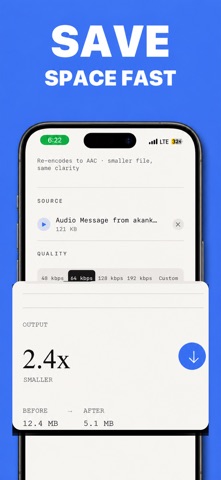
MP3 Compressor lets you shrink large audio files while keeping sound quality clear and crisp.


What it does
Compress audio files on iPhone
MP3 Compressor lets you shrink large audio files while keeping sound quality clear and crisp. Perfect for music, voice recordings, podcasts, and sharing files online.
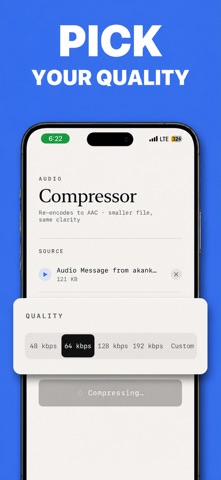
Adjustable bitrate & quality
Share compressed files easily
Privacy-focused – files stay on your device
Simple & clean interface
From the App Store listing
A look inside
Official listing screenshots. Select an image to view it larger.
Use cases and capabilities
Tasks this app is listed for
These points come from the current App Store description.
- Adjustable bitrate & quality
- Share compressed files easily
- Privacy-focused – files stay on your device
- Simple & clean interface
Getting started
Check the listing, then try the app.
- Choose the MP3 file you want to make smaller.
- Select a bitrate or quality setting in the compressor, then compare the available settings against the space and sound quality you need.
- Compress the file, listen to the exported copy, and save or share it if it meets your needs.
These steps follow the features in the current App Store description. Exact controls can change between versions.
Common questions
About Audio File Compressor - Shrink
Can I control how much an MP3 is compressed?
The listing describes adjustable bitrate and quality settings. The resulting file size and sound quality depend on the chosen setting and the source file.
Can I use it without an internet connection?
The listing says the compressor works offline and keeps files on the device. Check the current App Privacy details and app behavior for the latest storage information.
More in Utilities
Related apps
UtilitiesVideo file Size CompressorVideo Compressor Pro - Shrink Videos, Save Space!Explore app  UtilitiesAudio File Merger & JoinerMerge Audio Files – Join Audio is a powerful and easy-to-use tool that allows you to combine multiple audio files into one.Explore app
 UtilitiesShrink PDF Audio Video PhotoLarge files should not get in the way of sharing.Explore app
 UtilitiesAudio File To Text TranscribeStop typing and start recording.Explore app