



 UtilitiesImage to PDF - Photo to PDFConvert Your Photos into High-Quality PDFs —, Easy & Offline!Explore app
Utilities app by Fenuku Kekeli
Shrink PDF Audio Video Photo
Large files should not get in the way of sharing.


What it does
Compress common file types on iPhone for sharing or storage
Large files should not get in the way of sharing.
Compress Video Photo Audio makes it simple to create a smaller copy of the files you need to send or save — while leaving the original untouched.
Compress the formats you use most:
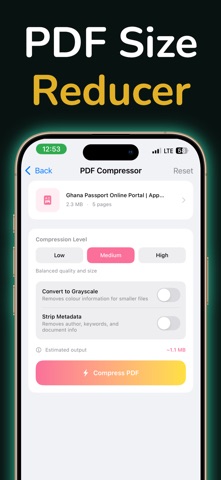
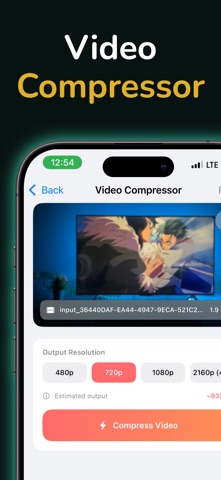
- Videos — choose an output resolution that fits how you plan to share. - Photos — fine-tune image quality, then compare the result side by side. - PDFs — select a compression level and optionally reduce colour or metadata. - Audio — create an M4A (AAC) copy with the bitrate you need. - ZIP archives — create an archive from multiple files or extract an existing ZIP.
See exactly what changed before you export: Compress Video Photo Audio shows the original size, compressed size, and space saved after every completed job.
1. Choose a photo, video, PDF, audio file, or files for a ZIP archive. 2. Pick the quality or output setting that suits the moment. 3. Compress, compare, then save or share the smaller copy.
Your original files are never modified. Completed compressions remain available locally until you choose to delete them.
Some export features require Compress Video Photo Audio Pro.
From the App Store listing
A look inside
Official listing screenshots. Select an image to view it larger.
Use cases and capabilities
Tasks this app is listed for
These points come from the current App Store description.
- Videos — choose an output resolution that fits how you plan to share.
- Photos — fine-tune image quality, then compare the result side by side.
- PDFs — select a compression level and optionally reduce colour or metadata.
- Audio — create an M4A (AAC) copy with the bitrate you need.
- ZIP archives — create an archive from multiple files or extract an existing ZIP.
- Choose a photo, video, PDF, audio file, or files for a ZIP archive.
Getting started
Check the listing, then try the app.
- Choose a file from Photos or Files and select the matching video, photo, PDF, audio, or ZIP workflow.
- Set the available quality, resolution, bitrate, or PDF compression options, then review the estimated output and comparison.
- Export the new copy and open it once to confirm it looks or sounds acceptable; the original remains available until you choose to remove it.
These steps follow the features in the current App Store description. Exact controls can change between versions.
Need task-specific steps? A guide in the original archive covers this app.
Common questions
About Shrink PDF Audio Video Photo
Which file types can I compress?
The listing describes video, photo, PDF, and audio compression, plus creating or extracting ZIP archives. Audio exports are described as M4A using AAC.
Will compression keep the original file?
The listing says the original remains untouched and a smaller copy is created. Check the exported copy before removing the original from Photos or Files.
More in Utilities
Related apps
UtilitiesImage to PDF - Photo to PDFConvert Your Photos into High-Quality PDFs —, Easy & Offline!Explore app  Photo & VideoPhoto & Video MergerPhotos & Videos Merger – Create Stunning Videos from Your Favorite MemoriesExplore app
 UtilitiesAudio File Compressor - ShrinkMP3 Compressor lets you shrink large audio files while keeping sound quality clear and crisp.Explore app
 UtilitiesVideo to Audio Converter | MP3Extract high-quality audio from any video in just a few taps.Explore app