




 UtilitiesAudio File Merger & JoinerMerge Audio Files – Join Audio is a powerful and easy-to-use tool that allows you to combine multiple audio files into one.Explore app
Utilities app by Fenuku Kekeli
Audio File Trimmer & Cutter
Audio File Trimmer & Cutter helps you turn recordings, songs, voice notes, and clips into clean audio files in minutes.


What it does
Trim audio files on iPhone
Audio File Trimmer & Cutter helps you turn recordings, songs, voice notes, and clips into clean audio files in minutes.
Open an audio file, zoom into the waveform, and choose exactly where your cut should begin and end. Keep the selected part, or remove a section and join the remaining audio together. Preview your edit, adjust the range with fine time controls, then export the finished file.
Waveform editor with zoom, handles, and precise time controls
Keep a selected section or remove an unwanted section
Fade in and fade out for smoother starts and endings
Normalize volume or adjust export gain
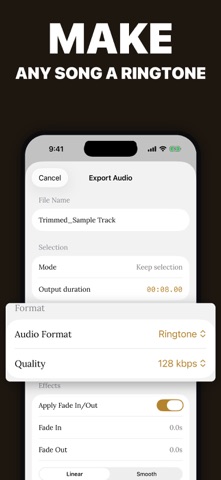
Export as M4A, AAC, WAV, CAF, or iPhone ringtone
Save to Files or share the finished audio
From the App Store listing
A look inside
Official listing screenshots. Select an image to view it larger.
Use cases and capabilities
Tasks this app is listed for
These points come from the current App Store description.
- Waveform editor with zoom, handles, and precise time controls
- Keep a selected section or remove an unwanted section
- Fade in and fade out for smoother starts and endings
- Normalize volume or adjust export gain
- Export as M4A, AAC, WAV, CAF, or iPhone ringtone
- Save to Files or share the finished audio
Getting started
Check the listing, then try the app.
- Choose an audio file and use the zoomable waveform to mark the section to keep or the unwanted segment to remove.
- Preview the edit and refine the start and end points with the time controls; add a fade or adjust output gain if needed.
- Export the checked audio as M4A, AAC, WAV, CAF, or an iPhone ringtone, then save it to Files or share it.
These steps follow the features in the current App Store description. Exact controls can change between versions.
Common questions
About Audio File Trimmer & Cutter
Can I cut out a section from the middle of a recording?
The listing says you can keep one selected section or remove an unwanted section and join the remaining audio.
Which export formats are listed?
The description names M4A, AAC, WAV, CAF, and iPhone ringtone. Check the app’s current export options before starting an edit.
More in Utilities
Related apps
UtilitiesAudio File Merger & JoinerMerge Audio Files – Join Audio is a powerful and easy-to-use tool that allows you to combine multiple audio files into one.Explore app  UtilitiesAudio File To Text TranscribeStop typing and start recording.Explore app
 UtilitiesAudio File Compressor - ShrinkMP3 Compressor lets you shrink large audio files while keeping sound quality clear and crisp.Explore app
 UtilitiesAudio Converter: MP3, WAV, M4AAudio Converter turns any sound file into the format you actually need no watermarks, no uploads, no waiting on a server.Explore app