


 UtilitiesCSV to Excel ConverterCSV to Excel Converter is a simple tool that allows you to convert CSV files into Excel (XLSX) spreadsheets.Explore app
Utilities app by Fenuku Kekeli
CSV To PDF Converter
Convert your CSV files into clean, professional PDFs.


What it does
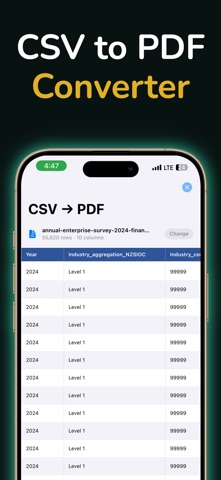
Convert a CSV table to PDF on iPhone
Convert your CSV files into clean, professional PDFs.
CSV to PDF Converter makes it easy to open, preview, and export spreadsheet data into high-quality PDF documents.
Preview rows and columns
Convert CSV to PDF in one tap
Export and share PDFs بسهولة
Clean, and simple interface
Perfect for students, business users, and anyone working with spreadsheet data.
From the App Store listing
A look inside
Official listing screenshots. Select an image to view it larger.
Use cases and capabilities
Tasks this app is listed for
These points come from the current App Store description.
- Import any CSV file
- Preview rows and columns
- Convert CSV to PDF in one tap
- Export and share PDFs بسهولة
- Clean, and simple interface
- Unlimited PDF exports
Getting started
Check the listing, then try the app.
- Import a CSV file and inspect the preview to make sure rows and columns were read correctly.
- Convert the table to PDF using the app’s export action.
- Open the PDF and check that columns, text, and page breaks are readable before sharing it.
These steps follow the features in the current App Store description. Exact controls can change between versions.
Need task-specific steps? A guide in the original archive covers this app.
How to Convert a CSV to PDF on iPhone and Keep the Table Readable ↗
Common questions
About CSV To PDF Converter
Can I preview the CSV before making a PDF?
Yes. The listing describes previewing rows and columns before the one-tap conversion.
Can I share the PDF from the app?
The listing says PDFs can be exported and shared. Check the finished PDF for clipped or very small columns before sending it.
More in Utilities
Related apps
UtilitiesCSV to Excel ConverterCSV to Excel Converter is a simple tool that allows you to convert CSV files into Excel (XLSX) spreadsheets.Explore app  UtilitiesExcel to PDF Converter | XLSXExcel to PDF Converter is a tool designed to convert spreadsheet files into high-quality PDF documents.Explore app
 UtilitiesPDF to Word Converter - DocConvert your PDF files back into fully editable Word documents.Explore app
 UtilitiesWord to PDF Converter - DOCConvert Word documents to PDF.Explore app