



 UtilitiesWord to PDF Converter - DOCConvert Word documents to PDF.Explore app
Utilities app by Fenuku Kekeli
PDF to Word Converter - Doc
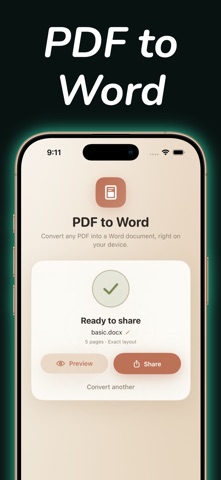
Convert your PDF files back into fully editable Word documents.


What it does
Convert PDF files to editable Word documents on iPhone
Convert your PDF files back into fully editable Word documents. A document utility for mobile PDF tasks.
No more retyping text or dealing with messy, broken formatting. Our high- conversion engine extracts text, tables, and paragraphs while beautifully preserving your original layout, making immediate edits completely.
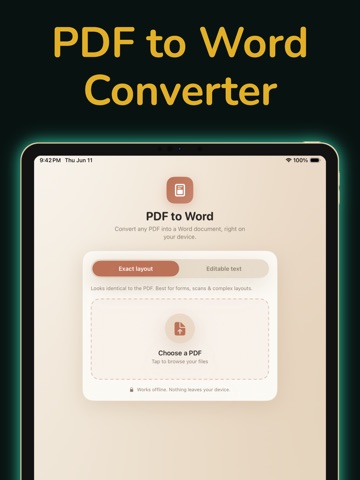
PDF to Word Conversion Convert standard and scanned PDF files into fully editable .docx.doc, or rich text documents with a single, tap.
Intelligent Formatting Preservation Retain your document's original structure. The conversion engine aligns text blocks, tables, columns, and font attributes.
Built-In Document Viewer & Reader Open, review, and scroll through your PDF files within a minimal, lightweight interface optimized for clear viewing.
Smart File Management & Export Keep your workplace organized. Share, email, or export your converted Word documents directly to iCloud Drive, Files, or local storage.
Privacy-First Device Processing Your data remains private. Enjoy ultra- file rendering that processes your documents securely right on your device without external server uploads.
From the App Store listing
A look inside
Official listing screenshots. Select an image to view it larger.
Use cases and capabilities
Tasks this app is listed for
These points come from the current App Store description.
- PDF to Word Conversion
- Intelligent Formatting Preservation
- Built-In Document Viewer & Reader
- Smart File Management & Export
- Privacy-First Device Processing
Getting started
Check the listing, then try the app.
- Choose a standard or scanned PDF from the app’s document viewer.
- Run the PDF-to-Word conversion and select a listed output format such as DOCX, DOC, or rich text.
- Open the converted document in a word processor and check text, tables, columns, and spacing before editing or sending it.
These steps follow the features in the current App Store description. Exact controls can change between versions.
Need task-specific steps? A guide in the original archive covers this app.
How to Turn a PDF into an Editable Word Document on iPhone ↗
Common questions
About PDF to Word Converter - Doc
Can it convert a scanned PDF to Word?
The listing says it supports standard and scanned PDFs and exports DOCX, DOC, or rich-text documents.
Will the Word file keep the PDF layout perfectly?
No converter can guarantee a perfect match across every file. The listing claims formatting preservation, but check tables, columns, and page breaks in the exported document before relying on it.
More in Utilities
Related apps
UtilitiesWord to PDF Converter - DOCConvert Word documents to PDF.Explore app  UtilitiesExcel to PDF Converter | XLSXExcel to PDF Converter is a tool designed to convert spreadsheet files into high-quality PDF documents.Explore app
 UtilitiesMarkdown to PDF .md ConverterConvert Markdown files into beautiful, professional PDF documents with ease.Explore app
 UtilitiesCSV To PDF ConverterConvert your CSV files into clean, professional PDFs.Explore app