

 UtilitiesExcel to PDF Converter | XLSXExcel to PDF Converter is a tool designed to convert spreadsheet files into high-quality PDF documents.Explore app
Utilities app by Fenuku Kekeli
Markdown to PDF .md Converter
Convert Markdown files into beautiful, professional PDF documents with ease.


What it does
Convert Markdown files to PDF on iPhone
Convert Markdown files into beautiful, professional PDF documents with ease. Markdown to PDF Converter .md is the way to transform .md files into high-quality PDFs while preserving formatting, headings, tables, code blocks, lists, links, and images.
Whether you're a developer, technical writer, student, blogger, or documentation author, you can create polished PDFs in just a few taps.
Convert Markdown (.md) files to PDF
Preserve headings, tables, code blocks, lists, and formatting
Support for images, links, and GitHub Flavored Markdown
Customize page size, margins, fonts, themes, and orientation
Live preview before exporting
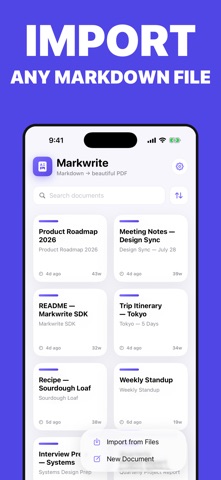
Import Markdown from Files or create documents in the built-in editor
From the App Store listing
A look inside
Official listing screenshots. Select an image to view it larger.
Use cases and capabilities
Tasks this app is listed for
These points come from the current App Store description.
- Convert Markdown (.md) files to PDF
- Preserve headings, tables, code blocks, lists, and formatting
- Support for images, links, and GitHub Flavored Markdown
- Customize page size, margins, fonts, themes, and orientation
- Live preview before exporting
- Import Markdown from Files or create documents in the built-in editor
Getting started
Check the listing, then try the app.
- Open a Markdown (.md) file from Files or create a document in the app’s editor.
- Adjust the page size, margins, fonts, theme, or orientation, then preview headings, tables, code blocks, lists, links, and images.
- Export or print the PDF and inspect the saved copy for code formatting and page breaks before sharing.
These steps follow the features in the current App Store description. Exact controls can change between versions.
Need task-specific steps? A guide in the original archive covers this app.
Common questions
About Markdown to PDF .md Converter
Does it support GitHub Flavored Markdown?
The listing says it supports GitHub Flavored Markdown as well as tables, code blocks, lists, links, and images.
Can I edit Markdown in the app before converting?
The listing says you can import a Markdown file from Files or create a document in the built-in editor.
More in Utilities
Related apps
UtilitiesExcel to PDF Converter | XLSXExcel to PDF Converter is a tool designed to convert spreadsheet files into high-quality PDF documents.Explore app  UtilitiesPDF to Word Converter - DocConvert your PDF files back into fully editable Word documents.Explore app
 UtilitiesWord to PDF Converter - DOCConvert Word documents to PDF.Explore app
 UtilitiesCSV To PDF ConverterConvert your CSV files into clean, professional PDFs.Explore app