


 UtilitiesScan to PDF - PDF Doc ScannerAuto edge detection and smart filters for clean results.Explore app
Utilities app by Fenuku Kekeli
Image to Text | OCR Scanner
Extract text from anything.


What it does
Extract text from images with OCR on iPhone
Extract text from anything.
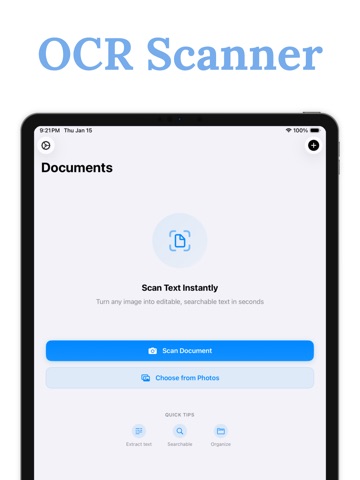
Text Extractor is the simplest way to scan text from any image, photo, or document. Powered by Apple’s OCR technology, you can extract, edit, and export text.
Select photos or use your camera
Auto-detect text using OCR
Edit and clean up scanned text
Export to PDF, TXT, or copy to clipboard
Scan printed documents, handwriting, signs, and more
Whether you're digitizing notes, scanning receipts, or translating signs, Text Extractor makes it.
From the App Store listing
A look inside
Official listing screenshots. Select an image to view it larger.
Use cases and capabilities
Tasks this app is listed for
These points come from the current App Store description.
- Text Extractor is the simplest way to scan text from any image, photo, or document. Powered by Apple’s OCR technology, you can extract, edit, and export text.
- Select photos or use your camera
- Auto-detect text using OCR
- Edit and clean up scanned text
- Export to PDF, TXT, or copy to clipboard
Getting started
Check the listing, then try the app.
- Choose an existing photo or use the camera to capture the text you want to extract.
- Run OCR and review the recognized text, correcting names, numbers, or line breaks before using it.
- Edit the result, then copy it or export it as PDF or TXT.
These steps follow the features in the current App Store description. Exact controls can change between versions.
Common questions
About Image to Text | OCR Scanner
Can I edit the text after scanning?
The listing says recognized text can be edited and then copied or exported as PDF or TXT.
Is there a built-in iPhone alternative?
Yes. Apple Live Text can select and copy text from supported photos, videos, and camera views, with availability varying by language and region. This app’s listing adds an OCR workflow with editable and exportable text.
More in Utilities
Related apps
UtilitiesScan to PDF - PDF Doc ScannerAuto edge detection and smart filters for clean results.Explore app  EducationVoice to Text - Speech NotesTurn your voice into text with Voice to Text — the, simple, and powerful speech transcription app designed to help you capture ideas, notes, conversations, and important moments without typing.Explore app
 UtilitiesText to PDF - Text documentTurn your text and photos into high-quality PDFs.Explore app
 UtilitiesAudio File To Text TranscribeStop typing and start recording.Explore app