


 UtilitiesWord to PDF Converter - DOCConvert Word documents to PDF.Explore app
Utilities app by Fenuku Kekeli
Office: Docs, PDF, Spreadsheet
Open documents, scan pages, and manage office files in one simple app.


What it does
Scan paper documents to PDF on iPhone
Open documents, scan pages, and manage office files in one simple app. Read PDF, Word, Excel, PowerPoint, TXT, and CSV files, scan paper pages to PDF, and keep work or study files easy to access on iPhone and iPad.
Open DOC, DOCX, XLS, XLSX, PPT, PPTX, TXT, CSV, and PDF files
Scan paper documents and save them as PDF
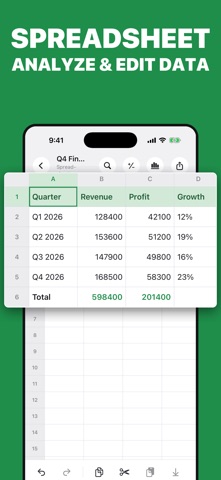
Review presentations, spreadsheets, reports, and notes
Keep important files organized in one place
From the App Store listing
A look inside
Official listing screenshots. Select an image to view it larger.
Use cases and capabilities
Tasks this app is listed for
These points come from the current App Store description.
- Open DOC, DOCX, XLS, XLSX, PPT, PPTX, TXT, CSV, and PDF files
- Scan paper documents and save them as PDF
- Review presentations, spreadsheets, reports, and notes
- Keep important files organized in one place
Getting started
Check the listing, then try the app.
- Open the scanner and frame the paper page you want to digitize.
- Review the captured page and add the next page if your document has more than one sheet.
- Save the scan as a PDF, then use the file area to open or organize supported office documents.
These steps follow the features in the current App Store description. Exact controls can change between versions.
Need task-specific steps? A guide in the original archive covers this app.
Common questions
About Office: Docs, PDF, Spreadsheet
Which document formats can the app open?
The listing names DOC, DOCX, XLS, XLSX, PPT, PPTX, TXT, CSV, and PDF.
Can I edit Word or Excel documents in the app?
The listing says it can open and review office files and scan paper to PDF; it does not describe editing the contents of Word or Excel files.
More in Utilities
Related apps
UtilitiesWord to PDF Converter - DOCConvert Word documents to PDF.Explore app  UtilitiesHighlight PDF - Markup NotesHighlight, annotate, and organize your PDF documents with PDF Highlighter & Annotator — the powerful tool designed for students, professionals, researchers, and everyday users who work with PDFs daily.Explore app
 UtilitiesPDF Page Remover: Edit PagesClean up any PDF.Explore app
 UtilitiesExcel to PDF Converter | XLSXExcel to PDF Converter is a tool designed to convert spreadsheet files into high-quality PDF documents.Explore app