




 UtilitiesAudio Converter: MP3, WAV, M4AAudio Converter turns any sound file into the format you actually need no watermarks, no uploads, no waiting on a server.Explore app
Utilities app by Fenuku Kekeli
WAV to MP3 - Audio Converter
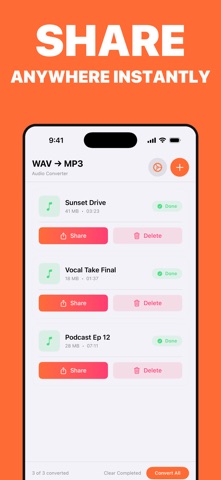
Convert WAV audio into MP3 and keep your files easier to share, save, and play anywhere.


What it does
WAV to MP3 converter for smaller shareable audio files
Convert WAV audio into MP3 and keep your files easier to share, save, and play anywhere. Exports, simple controls, and results on iPhone and iPad.
WAV to MP3 - Audio Converter helps you turn large WAV files into lighter, more compatible audio formats without complicated settings. Import your file, choose the format you need, and export a clean new version in moments.
Export to M4A and AAC when needed
Keep audio quality clear and consistent
Save smaller files for sharing and storage
Use a simple workflow on iPhone and iPad
Process your files privately on your device
Any WAV file you want in a lighter format
From the App Store listing
A look inside
Official listing screenshots. Select an image to view it larger.
Use cases and capabilities
Tasks this app is listed for
These points come from the current App Store description.
- Convert WAV to MP3
- Export to M4A and AAC when needed
- Keep audio quality clear and consistent
- Save smaller files for sharing and storage
- Use a simple workflow on iPhone and iPad
- Process your files privately on your device
Getting started
Check the listing, then try the app.
- Import a WAV file from Files or another supported source.
- Choose MP3, or select M4A/AAC if that better suits the destination.
- Convert and check the saved output before deleting or replacing the original.
These steps follow the features in the current App Store description. Exact controls can change between versions.
Need task-specific steps? A guide in the original archive covers this app.
Common questions
About WAV to MP3 - Audio Converter
Will an MP3 sound identical to a WAV source?
MP3 is compressed, so conversion may change audio detail. Keep the WAV source if you need an uncompressed original.
Can I choose M4A instead?
The listing also describes M4A and AAC export options.
More in Utilities
Related apps
UtilitiesAudio Converter: MP3, WAV, M4AAudio Converter turns any sound file into the format you actually need no watermarks, no uploads, no waiting on a server.Explore app  Photo & VideoWAV to M4A converterConvert WAV files to M4A (AAC) and easily with a simple interface designed for all users.Explore app
 UtilitiesVideo to Audio Converter | MP3Extract high-quality audio from any video in just a few taps.Explore app
 UtilitiesAudio File To Text TranscribeStop typing and start recording.Explore app