


 UtilitiesPDF to Word Converter - DocConvert your PDF files back into fully editable Word documents.Explore app
Utilities app by Fenuku Kekeli
Photo to PDF | PDF Converter
Convert your photos to high-quality PDF documents!


What it does
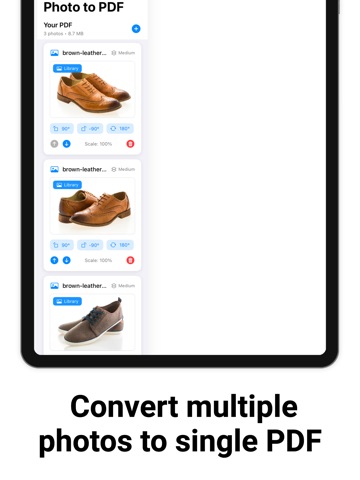
Convert multiple photos to a single PDF on iPhone
Convert your photos to high-quality PDF documents! The ultimate photo to PDF converter with batch processing, smart compression, and professional results.
Convert multiple photos to single PDF High-quality PDF output Batch processing support Smart compression options
From the App Store listing
A look inside
Official listing screenshots. Select an image to view it larger.
Use cases and capabilities
Tasks this app is listed for
These points come from the current App Store description.
- Convert multiple photos to single PDF High-quality PDF output Batch processing support Smart compression options
Getting started
Check the listing, then try the app.
- Select the photos you want to include in the PDF.
- Use the app’s batch conversion and smart compression options to create a single document.
- Open the exported PDF to verify image order, readability, and file size before sharing it.
These steps follow the features in the current App Store description. Exact controls can change between versions.
Need task-specific steps? A guide in the original archive covers this app.
Common questions
About Photo to PDF | PDF Converter
Can I put several photos into one PDF?
The listing describes converting multiple photos into a single PDF with batch processing.
Can I reduce the PDF file size?
The listing names smart compression options. Check the exported copy to make sure images remain readable at the size you need.
More in Utilities
Related apps
UtilitiesPDF to Word Converter - DocConvert your PDF files back into fully editable Word documents.Explore app  UtilitiesWord to PDF Converter - DOCConvert Word documents to PDF.Explore app
 UtilitiesPDF Maker - Editor & ConverterPDF Maker turns your iPhone into a full document workflow — scan, edit, convert, and share professional PDFs.Explore app
 UtilitiesExcel to PDF Converter | XLSXExcel to PDF Converter is a tool designed to convert spreadsheet files into high-quality PDF documents.Explore app